Moved
This page has been superseded by Reach. It stays here for old links.
lit-bridge#
The structured bridge between your application and interactive AI CLIs.
Your users shouldn't need a terminal to use Claude Code. lit-bridge lets your application talk to the CLI so they don't have to.
Using claude -p in production? Read this.
After June 15, 2025, pipe mode (-p) and --output-format json reclassify your application's usage as programmatic — different rate limits, different pricing, different terms. If your product depends on Claude Code's interactive capabilities, you need a path that keeps sessions interactive. That's what lit-bridge does.
View on GitHub → Contact for licensing →
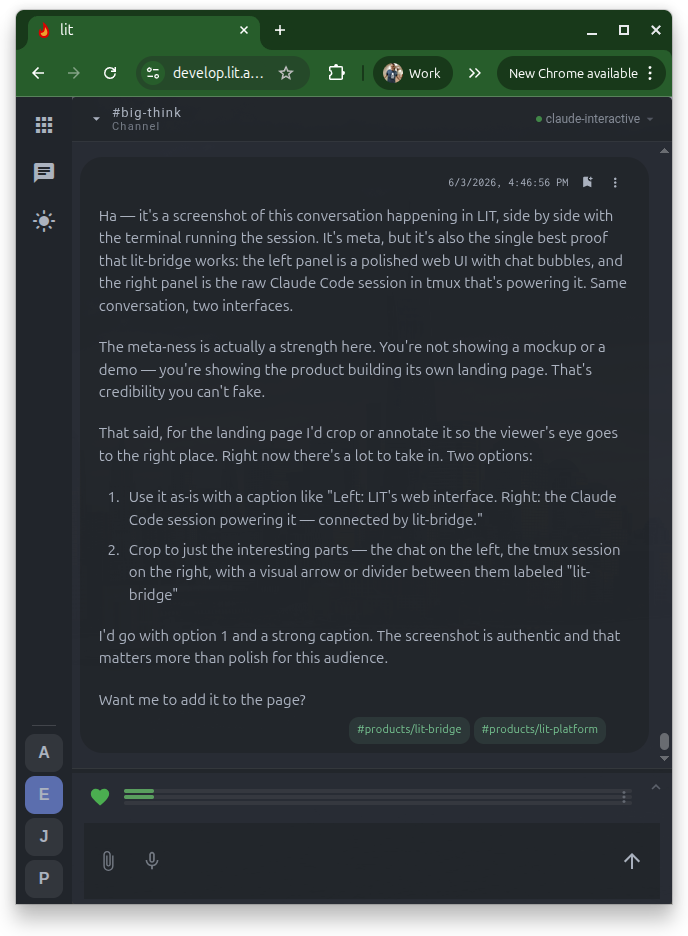
What your users see#
A polished web interface. Chat with markdown rendering, persistent channels, team collaboration, mobile access. No terminal in sight.
What's actually running#
A real Claude Code session in tmux. Full interactive mode — context management, tool permissions, MCP servers. lit-bridge connects the two.
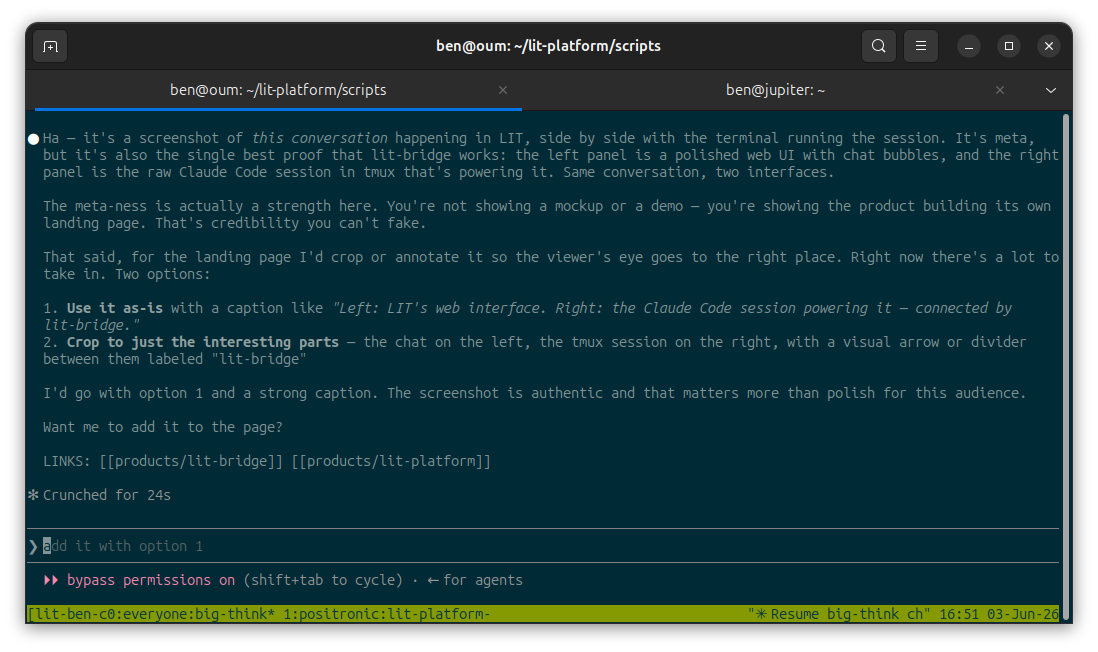
The problem#
Claude Code is powerful in interactive mode — context management, tool permissions, MCP servers, session resumption. But interactive mode means a terminal. If you want to give your users something better — a web interface, team collaboration, persistent history, mobile access — you're stuck parsing a TUI.
Pipe mode (-p) and JSON output flags are the obvious shortcut, but they strip away the interactive capabilities that made the CLI worth using in the first place and reclassify your usage as programmatic.
lit-bridge gives you structured access to interactive sessions without leaving interactive mode. The human still talks to the CLI. You just get to build a better room around the conversation.
How it works#
┌─────────────┐     JSON-lines       ┌─────────────┐     tmux      ┌───────────┐
│  Your App   │◄────────────────────►│  lit-bridge │◄─────────────►│ Claude CLI│
│             │   Unix socket        │   daemon    │   capture +   │  (in tmux)│
└─────────────┘                      └─────────────┘   send-keys   └───────────┘
- You send a command —
{"cmd": "send", "session": "dev-1", "content": "Fix the failing test"} - lit-bridge types it into a real terminal session
- The CLI responds — thinking, tool calls, streaming output
- lit-bridge parses the TUI and emits structured events back to you:
{"session": "dev-1", "event": "state", "from": "idle", "to": "thinking"}
{"session": "dev-1", "event": "tool_use", "tool": "Bash", "input": {"command": "pytest tests/"}}
{"session": "dev-1", "event": "replace", "text": "● Found the bug. The test was..."}
{"session": "dev-1", "event": "complete", "content": "● Fixed. The issue was...", "total_length": 847}
Your code never touches tmux. Never parses terminal output. Never manages processes.
Python example#
import socket, json

def connect(path="/tmp/lit-bridge.sock"):
    sock = socket.socket(socket.AF_UNIX, socket.SOCK_STREAM)
    sock.connect(path)
    return sock.makefile("rw")

def send_cmd(conn, cmd):
    conn.write(json.dumps(cmd) + "\n")
    conn.flush()

def read_events(conn):
    for line in conn:
        yield json.loads(line)

conn = connect()

# Create a session
send_cmd(conn, {"cmd": "create", "session": "dev", "cli": "claude"})

# Send a message and stream the response
send_cmd(conn, {"cmd": "send", "session": "dev", "content": "Explain quicksort"})

for event in read_events(conn):
    if event.get("event") == "replace":
        print(event["text"], end="\r")  # Live-update display
    elif event.get("event") == "complete":
        print(event["content"])         # Final response
        break
Key properties#
Zero dependencies. Python 3.10+ stdlib only. No pip packages.
Sessions survive everything. The daemon crashes? Restarts and adopts existing tmux sessions. Your app disconnects? Events buffer until it reconnects. The CLI compacts its context? lit-bridge detects it and tells you.
Multi-session. One daemon manages dozens of concurrent CLI sessions. Each session is independent — different models, different working directories, different tool permissions.
CLI-agnostic. All TUI-specific logic lives in parser plugins. Ship with Claude Code support; add any CLI by implementing the parser interface.
Through the front door. The CLI runs in a real terminal with full interactive capabilities. No pipe mode, no JSON output flags, no reclassification of usage. Your sessions look exactly like a developer sitting at a keyboard.
Who this is for#
You're building something on top of an AI CLI — a better interface, a team environment, a managed service — and you need the full interactive experience, not a stripped-down pipe mode.
Examples:
- AI development platforms that give developers a web-based environment for AI-assisted coding
- Team workspaces where multiple users share AI sessions through channels, with audit trails and persistent history
- Managed services that host AI CLI access for customers who want the power without the terminal
- Remote access — use Claude Code from your phone, a tablet, or any browser, with the session running on your real dev machine
- Internal tools that bring AI coding capabilities to non-terminal users through a custom interface
Licensing#
lit-bridge is source-available under the Business Source License 1.1.
- Non-production use: free (evaluation, development, testing, academic research)
- Production use: requires a commercial license
- After 4 years: converts to Apache 2.0
We accept contributions under a standard CLA.
Commercial licensing starts at $15,000/year per organization. Includes priority support, parser updates for new CLI versions, and integration guidance.
Early adopter pricing — lock in $10,000/year
Sign before August 31, 2026 and lock in 10,000 USD / year for the life of your license. Same support, same updates — just $5,000 less, permanently. This pricing goes away September 1.
Quick start#
# Clone the repo
git clone https://github.com/Positronic-AI/lit-bridge.git

# Start the daemon
python3 lit-bridge/server.py --socket /tmp/lit-bridge.sock

# Connect and interact (using socat for demo)
echo '{"cmd":"create","session":"demo","cli":"claude","parser":"claude-code"}' \
  | socat - UNIX-CONNECT:/tmp/lit-bridge.sock

echo '{"cmd":"send","session":"demo","content":"Hello, world"}' \
  | socat - UNIX-CONNECT:/tmp/lit-bridge.sock
Full protocol documentation: GitHub README
Built by Positronic AI — the team behind LIT Platform.